Most of our web and email hosting plans allow you to add forwarders to existing email addresses. With forwarders, you can forward copies of incoming messages to one or more email addresses automatically and is particularly useful when you wish to communicate with a team without having to send each team member a separate email, or without giving them access to a separate, group email account.
This help article will discuss how you can create an email forwarder.
Before You Begin
To be able to add an email forwarder successfully, please ensure that you have:
- An active and eligible web or email hosting plan with us.
- An active email account on your web hosting account. Click here to learn how to create an email account.
- A compatible laptop or desktop computer with a compatible web browser and a stable internet connection.
Step 1 - Log In to SPanel
From a compatible web browser, visit https://yourdomain.co.nz/hostpanel (be sure to substitute the domain name with your existing domain name):
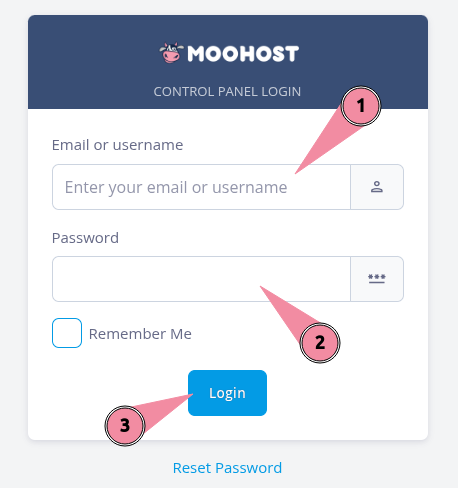
- Enter your registered email address or username in the Email or username field.
- Enter your password in the Password field.
- Click on Login to log in to SPanel.
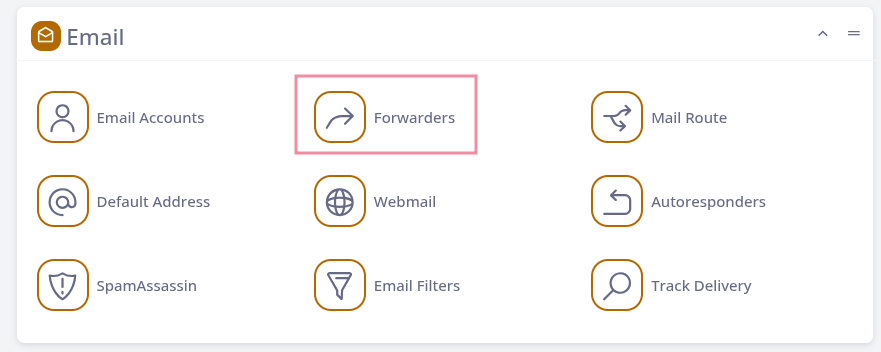
Step 2 - Access Forwarders
From SPanel, locate and click Forwarders in the Email section:
Step 3 - Add Your Forwarder
Once the Email Forwarders page loads, do the following:
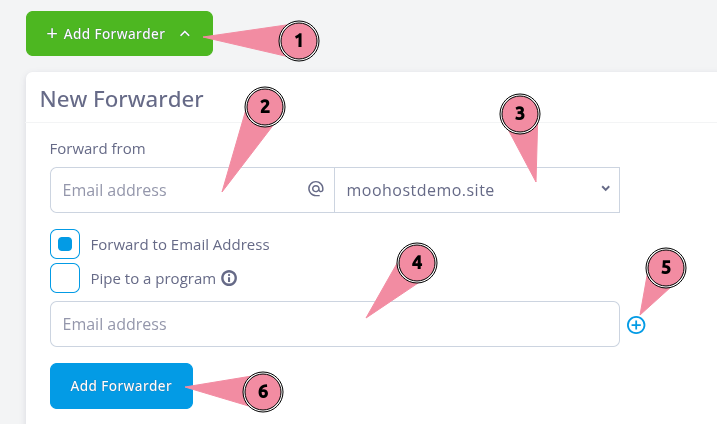
- Click on Add Forwader to bring up the options.
- Enter the email address from which you wish to forward emails in the Forward from field.
- Optional: Choose the domain name of the email address you are forwarding from from the dropdown if you have multiple domains.
- Enter the full email address to which you wish to forward incoming emails in the Email address field.
- Optional: Click on the plus icon to add more email addresses to which you wish to forward emails from the same email address.
- Click on Add Forwarder to finish.